 Help Center
Follow these steps to add an insurance company to a patient:
- Open the patient's account and go to Financials > Insurance
- Add or Select a Sequence Group from the list on the left. Sequence groups are used to determine the Insurance sets to be used. Multiple sequence groups are used when a patient has multiple types of insurances such as medical primary and worker's comp.
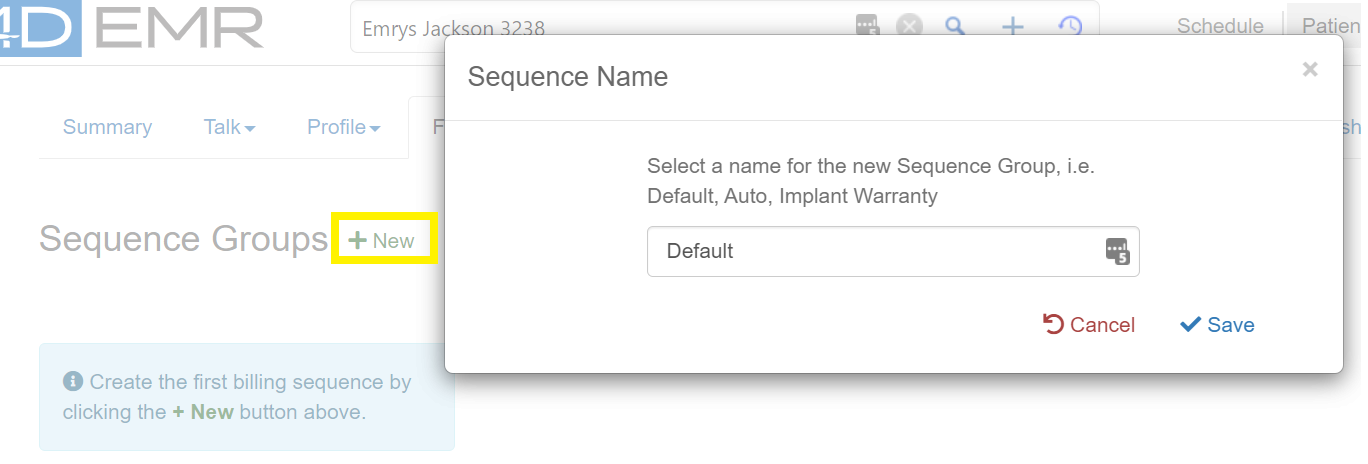
- To Add a new Sequence Group click the +New button.
- Enter a name for the sequence group and click Save
- Add an insurance company by clicking on the +New button
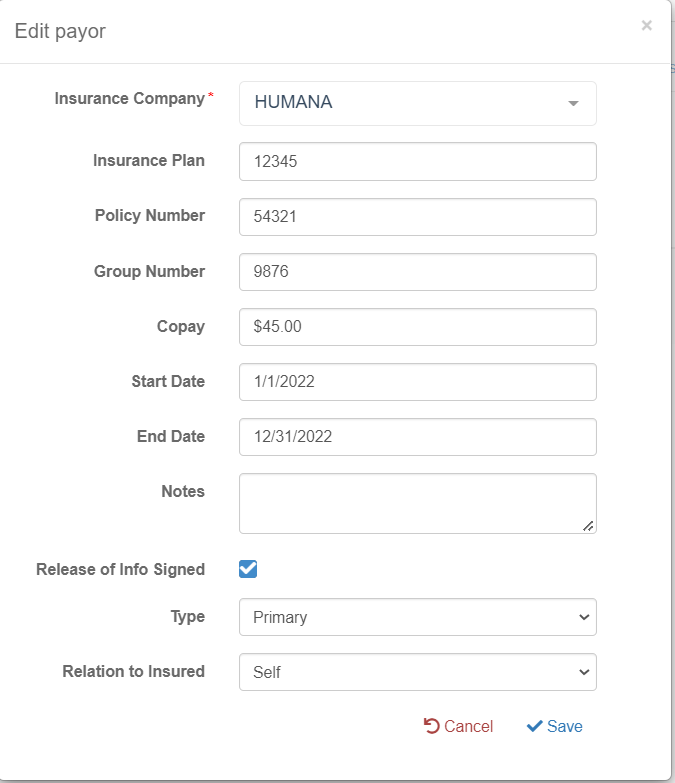
- Enter the Insurance information into the form entering as much information as possible based on the Patient's Insurance Card.
- Coverage start date, copayment amount, and insurance type are required for insurance features to work.
Scanning Insurance Cards to Patient Accounts
It is highly recommended to scan each patient's insurance cards to their account. This will reduce the need to contact patients in case information is incorrectly entered on accounts and may provide information useful for resolving rejections.